One of the many features that Google introduced in its newly launched social platform: Google+, is that it displays all your Picasa web albums in the photo section of your Google+ account. You can view photos from your circles, your phone, your own photos and of course, it allows you to view, edit or delete your Picasa web albums directly from the Google+ interface.
What’s the link between Google Plus Albums and Blogger Posts?
 Many Blogger blog users are not aware that the photos they use on their blog posts are saved in their Picasa web album. So when they join Google+ for the first time and see all their photos from their blog, they assume that the photos are also viewable by their friends and family members or even anyone who isn’t in their circles.
This is when the problem starts. Some Google+ users start deleting their albums and can unknowingly end up deleting the albums containing photos they have used on their blog posts for years.
This can easily be avoided. Users must know two things to be on the safe side:
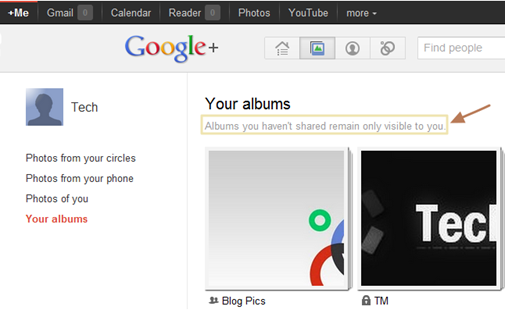
1) Albums that you have not shared will be visible only to you:
As a Google+ users, you shouldn’t be worried about your blog images showing up in the photo section of their Google+ account as only the images that you share will be visible to your circles.
2) Deleting Photos from Google+ will also be permanently deleted from Picasa web album.
Any Picture that you remove from your Google Plus account will also be removed permanently from Picasa web album, hence from your blog if you had used it on your blog.
When you are about to delete an album, a dialog box will be displayed stating that photos will also be removed from Blogger, Picasa Web and other Google Products.

Related: Backup your Picasa Web Photos and data from other Google Product


 The Data Liberation Front, an engineering team at Google has launched a new service called Google Takeout, allowing users to create backups of data from various Google services.
 If you are thinking of protecting some of your highly confidential documents before sending them across multiple systems using the popular Dropbox service, SecretSync is an app just for that. It adds a client side encryption and protection for Dropbox files.
 Google recently announced the end of development for it Gears plugin and that it will be shifting focus to HTML5. Internet explorer 9, Firefox 4 and Chrome 12 no longer support offline backup of Gmail and Google Docs via gears.


