Change YouTube Player Color to White or Black For Embedded Videos

Change YouTube Player Color to White or Black For Embedded Videos

youtubeGoogle recently changed the theme of its YouTube player from white to black. When you embed a video to your blog or website, you can, not only modify the appearance to white or black, according to your webpage theme but also change the color of the seek bar.

How To Embed Videos Using Black or White YouTube Player Skin?


To modify the player’s appearance to your liking you need to add the code in red to the embed code. You can choose from the following new themes introduced by YouTube:

Black Theme With Red Seek Bar:

youtube-dark-red
<iframe src="http://www.youtube.com/embed/vYCahlG6bdY?theme=dark&color=red" frameborder="0" width="520" height="326" allowfullscreen></iframe>

Black Theme With White Seek Bar:

youtube-dark-white
<iframe src="http://www.youtube.com/embed/vYCahlG6bdY?theme=dark&color=white" frameborder="0" width="520" height="326" allowfullscreen></iframe>

White Theme With Red Seek Bar:

youtube-light-red
<iframe src="http://www.youtube.com/embed/vYCahlG6bdY?theme=light&color=red" frameborder="0" width="520" height="326" allowfullscreen></iframe>

White Theme With White Seek Bar:

youtube-light-white
<iframe src="http://www.youtube.com/embed/vYCahlG6bdY?theme=light&color=white" frameborder="0" width="520" height="326" allowfullscreen></iframe>

Fast Email Fetching In Gmail

Fast Email Fetching In Gmail

gmail-logoPOP e-mail fetching is a great feature of Gmail to retrieve messages from your other emails accounts via POP and display them in your inbox alongside the emails that come directly to your Gmail account.

Anyone who has been channeling emails from various addresses to one master Gmail address, knows that Gmail uses a timing algorithm to retrieve messages from POP accounts. The problem, however is the time lag. Often you would want to instantly check whether the email you were waiting for has arrived or not.

Quickly Check If a New Email Has Arrived or Not :

To check or retrieve emails at any desired time, head to your email settings and under Labs, enable the “Refresh POP Accounts” option. Then save changes.

gmail-fetching

From now on you will see a refresh link at the top of your inbox. Whenever you refresh, Gmail will check and retrieve any new message from any of your associated accounts.

email-fetching


Images Missing from Blogger Blog Posts when deleted from Google+ Albums

Images Missing from Blogger Blog Posts when deleted from Google+ Albums

One of the many features that Google introduced in its newly launched social platform: Google+, is that it displays all your Picasa web albums in the photo section of your Google+ account. You can view photos from your circles, your phone, your own photos and of course, it allows you to view, edit or delete your Picasa web albums directly from the Google+ interface.


What’s the link between Google Plus Albums and Blogger Posts?

imageMany Blogger blog users are not aware that the photos they use on their blog posts are saved in their Picasa web album. So when they join Google+ for the first time and see all their photos from their blog, they assume that the photos are also viewable by their friends and family members or even anyone who isn’t in their circles.
This is when the problem starts. Some Google+ users start deleting their albums and can unknowingly end up deleting the albums containing photos they have used on their blog posts for years.

This can easily be avoided. Users must know two things to be on the safe side:

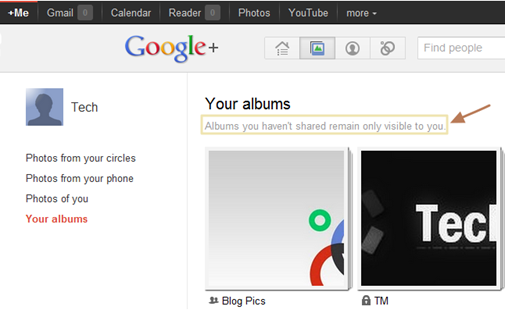
1) Albums that you have not shared will be visible only to you:

As a Google+ users, you shouldn’t be worried about your blog images showing up in the photo section of their Google+ account as only the images that you share will be visible to your circles.

google-photos


2) Deleting Photos from Google+ will also be permanently deleted from Picasa web album.

Any Picture that you remove from your Google Plus account will also be removed permanently from Picasa web album, hence from your blog if you had used it on your blog.

When you are about to delete an album, a dialog box will be displayed stating that photos will also be removed from Blogger, Picasa Web and other Google Products.

google-plus-delete-msg


Related: Backup your Picasa Web Photos and data from other Google Product


The Various Activities On The Internet Every Minute [Infographic]

An interesting and informative Infographic produced by Shanghai Web Designers highlights many of the major activity going on every sixty seconds on the internet. These include video uploads, domains registered, new blogs and much more. As the number of internet subscribers increase, it is estimated that almost a billion new pages are published every day.

60 Seconds - Things That Happen On Internet Every Sixty Seconds
Infographic by- Shanghai Web Designers                                                           [Click to enlarge]

The following stats are highlighted in the graphic.
  • Search engine Google serves more that 694,445 queries
  • 6,600+ pictures are uploaded on Flickr
  • 600 videos are uploaded on YouTube videos, amounting to 25+ hours of content
  • 695,000 status updates, 79,364 wall posts and 510,040 comments are published on Social Networking site Facebook
  • 70 New domains are registered
  • 168,000,000+ emails are sent
  • 320 new accounts and 98,000 tweets are generated on Social Networking site Twitter
  • iPhone applications are downloaded more than13,000 times
  • 20,000 new posts are published on Micro-blogging platform tumbler
  • Popular web browser Firefox is downloaded more than 1700 times
  • Popular blogging platform WordPress is downloaded more than 50 times
  • WordPress Plugins are downloaded more than 125 times
  • 100 accounts are created on professional networking site LinkedIn
  • 40 new Questions are asked on Yahoo Answers.com
  • 100+ questions are asked on Answers.com
  • 1 new article is published on Associated Content, the world’s largest source of community-created content
  • 1 new definition is added on Urban Dictionary.com
  • 1,200+ new ads are created on Craigslist
  • 370,000+ minutes of voice calls done by Skype users
  • 13,000+ hours of music streaming is done by personalized Internet radio provider Pandora
  • 1,600+ reads are made on Scribd, the largest social reading publishing company

Vista Users: Don’t Download IE 10

Vista Users: Don’t Download IE 10

IE-10
While the platform preview of Internet Explorer 10 is available for use with windows 7, the users of vista or XP won’t be able to use the latest release of the still widely used Microsoft Internet Explorer even when the final release is made.

The surprise announcement came when computer world’s Gregg Keizer contacted Microsoft to find out about its plan for supporting IE 10 in windows Vista.

Microsoft confirmed that the latest release will only support windows 7 by giving the following email response:

Windows Vista customers have a great browsing experience with IE9, but in building IE10 we are focused on continuing to drive the kind of innovation that only happens when you take advantage of the ongoing improvements in modern operating systems and modern hardware.
Although vista is no longer the OS of choice for both business or individual users. Globally, however XP is still the most widely used OS. The lack of the latest IE support or any other applications makes windows XP users the bigger sufferers.

ie-10-installer

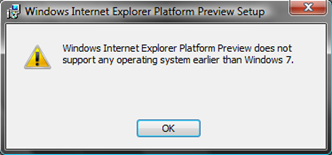
If users try to install IE 10 Platform preview on windows vista they will get an error message and the installer will shuts down.

Google Plus Keyboard Shortcuts and Goo Plus Manager

Keyboard shortcuts are a great way to save time. Instead of finding a menu or an option, you just press a combination of keys. Google+ already has a few built-in shortcuts which you can use to navigate through the Google+ interface.

Installing Goo Plus Manager extension for chrome adds several keyboard shortcuts which can be used to jump to various sections in Google+.

Moving to sections:
g + h : go home
g + p : go to profile
i + i : go to photos
i + p : go to phone photos
i + m : go to photos of me
i + a : go to my photo albums
g + i : go to incoming
g + n : go to notifications

Navigating
:
(Already in Google Plus):
j
:
Go to next post
k
:
Go to previous post
Space
:
Move down Stream by regular intervals
Shift + Space
:
Move Up Stream by regular intervals
Enter
:
When a Stream update is selected Enter /Return moves the cursor to the comment box
QQ
:
Gives focus to the comments box
Enter + Tab
:
Submit Comment


Formatting Text:


*
:
Using * symbol in the beginning and end of a text will make the text bold.
*This will appear bold*
_
:
Using _ symbol in the beginning and end of a text will make the text italic.
_This will appear italic_
-
:
Using – symbol in the beginning and end of a text to strikethrough text.
-This is a strikethrough text-
@ / +
:
To mention someone in a text use the @ or + symbol before their name.
@Sara

Goo Plus Manager Menu Options:

In your Google+ profile Goo Plus Manager appears besides the notification box on the top right corner of all Google Pages. Simply clicking on its icon drops down a menu with the following options for easy navigation.
- Home
- Profile
- My Photos
- My albums
- Photos
- Phone Photos
- Circles
- Incoming
- Notifications
- Shorten Links

Download Goo Plus Manager chrome extension.

Google lets you make money by solving problems

Google lets you make money by solving problems


Google has launched a new social platform where people can earn money by solving problems.

Prizes.org is run by Slide, a gaming company that Google acquired last year for $182m. The Idea behind this new service is simple: Users create a contest where they post a question or task and fix a cash amount for the best answer or task to be done. For example users can ask for ideas for a new website, advice on a comprehensive “Get Healthy” plan, or planning an ideal summer vacation, etc.

Each task is to be done within a fixed amount of time, during which people can vote for the best answer or advice given. The user with the most votes wins the cash prize. The money on offer currently for the questions is between 10$-50$.

Interesting to note that the site features very little Google branding and the sign-in, currently is through Facebook or Twitter, not with a Google ID, which may be a smart move to reach a bigger audience.

prizes-org

Prizes.org is in beta but its available for everyone, although the contest creation like all recently launched Google services is still invites-only.